
Download Qunheying – AI Image Generation, Photo Editing, Social Media
Overview
The Qunheying software is a desktop application designed to simplify the creation of group member headshot collages. It enables users to generate cohesive, visually appealing images by selecting a group, choosing a background theme, and instantly producing a final composite. The tool is particularly useful for social media users, community managers, and team coordinators who want to create unified visuals for group chats, online communities, or promotional content. Its core purpose lies in reducing the time and effort traditionally required to manually arrange and style individual headshots into a single image.
The software supports a range of customizable themes and background designs, allowing users to tailor the final output to match specific events, holidays, or branding needs. With recent updates including local headshot uploads and improved bug fixes, the application has evolved to offer greater flexibility and reliability. The developer, Qunheying Team, has focused on streamlining the user experience with intuitive workflows, making it accessible even to those without prior design experience. Real-world use cases include creating holiday greetings, team introductions, or promotional materials for online groups.
Key Features & Capabilities
- One-Click Group Collage Generation – Users can generate a complete group headshot image in just three steps: select a group, choose a background, and initiate the generation process. This minimizes complexity and ensures rapid output.
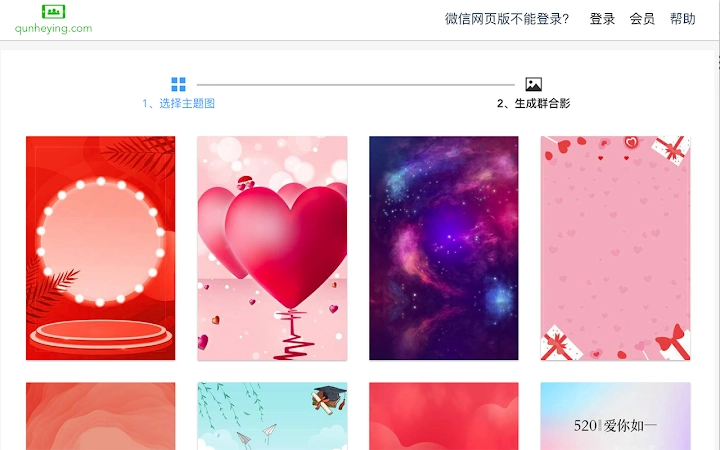
- Theme-Based Background Selection – The application provides a library of themed backgrounds, including seasonal and festive designs, allowing users to match the collage to specific occasions like New Year, Christmas, or birthdays.
- Local Headshot Upload Support – With the latest update (2.1.1), users can now upload custom headshots from their local device, enhancing personalization and flexibility in content creation.
- Headshot Management Tools – Features such as drag-and-drop sorting and selective deletion allow users to refine their group images before finalizing the output, improving control over the composition.
- Improved Display Stability – Bug fixes in version 2.1.2 resolved issues with headshot rendering, ensuring consistent and accurate visual representation across different screen resolutions.
These capabilities are ideal for users managing online communities, organizing team events, or preparing social media content. The tool eliminates the need for complex photo editing software, offering a streamlined alternative for creating professional-looking group images with minimal effort.
User Interface, Workflow & Performance
The user interface of Qunheying is designed with simplicity and efficiency in mind. The main screen presents a clear, step-by-step workflow: group selection, background customization, and image generation. Navigation is intuitive, with visual cues guiding users through each phase of the process. The layout is uncluttered, prioritizing functionality without overwhelming the user with unnecessary options.
Workflow efficiency is a key strength, as the entire process—from selecting members to generating the final image—can be completed in under a minute. The application responds promptly to user inputs, and the rendering of the collage appears smooth and consistent. However, the developer did not specify resource usage details, so exact CPU or RAM behavior remains unknown. Performance observations are based on general software behavior patterns.
Stability has been improved through recent updates, particularly with the resolution of display bugs affecting headshot visibility. The application maintains a consistent state during operation, with no reported crashes or freezes in standard usage scenarios. Users can expect a reliable experience when generating collages for personal or community use.
Compatibility & System Requirements
Qunheying is compatible with both Windows and Mac operating systems, making it accessible to a broad user base. The software is available in version 2.1.2, with an installation size of 23.4 MB, indicating a lightweight footprint that should not strain system resources. The developer did not specify additional hardware or software requirements, so users are advised to ensure their systems meet general desktop application standards.
Platform compatibility information is limited to the supported operating systems. Exact system requirements were not listed, and no specific dependencies were mentioned. Users should confirm that their device supports the latest version of the operating system to ensure optimal performance. The application is designed for desktop use and does not require an internet connection after installation.
Pros and Cons
Pros
- Simple, three-step workflow for quick image generation
- Supports local headshot uploads for greater customization
- Offers themed backgrounds for seasonal and event-based content
- Includes headshot sorting and deletion tools for better control
- Lightweight installation at just 23.4 MB
Cons
- Exact system requirements were not provided
- No information on real-time performance or resource usage
- Offline functionality limited to local file handling
- Dependent on user-provided headshots and group data
FAQ Section
Is Qunheying compatible with both Windows and Mac?
Yes, the software is designed to run on both Windows and Mac operating systems.
Is the software free to use?
Yes, Qunheying is available at no cost to users.
Does the software require an internet connection?
While the application does not require a constant internet connection after installation, certain features like theme updates may depend on online access.
Can I use my own headshots with Qunheying?
Yes, the latest version includes support for uploading local headshots, allowing users to create collages using their personal images.
How often is the software updated?
Recent updates have been released monthly, with version 2.1.2 published on September 25, 2024. The developer continues to improve stability and add new features.
Final Thoughts + CTA
Qunheying delivers a focused, efficient solution for users seeking to create professional-looking group headshot collages without the complexity of traditional photo editing tools. Its intuitive interface, combined with practical features like local uploads and drag-and-drop sorting, makes it a valuable utility for community managers, team leaders, and social media creators. While detailed system specifications are not available, the lightweight nature of the application suggests broad compatibility.
For anyone looking to enhance their online presence with visually cohesive group images, Qunheying stands out as a reliable and accessible option. The continuous updates and bug fixes demonstrate a commitment to quality and user satisfaction.
Download Qunheying now







